I have written a perl script to install iraf under linux systems. It works fine for debian 7 (and should also work for ubuntu).
How use it:
1- Download it here
2- Enter the directory you download it: e.g. cd /tmp/
3- Run it: perl install_iraf.pl
4- Follow the instructions.
Tested on Debian 7- 64 bits.
Suggestions are welcome.
Wednesday, May 22, 2013


Wednesday, June 6, 2012
Sincronizando pastas e arquivos do PC do laboratório com o PC de casa
Se você está lendo esse post, provavelmente é um aluno usuário de computador do laboratório de astronomia, ou um computador do IF. Deve também ser do teu interesse sincronizar pastas e arquivos desse computador pra um computador de casa.
Para não precisar ficar atualizando pastas com o scp, onde tu tem que transferir arquivos que tu ja provavelmente tem dentro das pastas, o comando rsync é muito útil. Ele sincroniza pastas e seus arquivos internos mantendo arquivos idênticos e transferindo arquivos diferentes.
Bom, isso é uma maravilha, mas como vou fazer isso em PCs do IF, onde tenho que passar pela frontdoor? É simples.
Para passar pelo frontdoor, posso citar outro post, do Rogério (http://astro-stuff.blogspot.com.br/2008/11/ssh-sem-senha.html):
ssh -L 2000:nomedopc:22 frontdoor do if
onde tu substitui "nomedopc" pelo nome da máquina que tu quer acessar. Para logar no PC desejado, digite:
ssh usuário@localhost -p 2000
obviamente trocando "usuario" pelo seu nome de usuário. Agora pra sincronizar uma pasta do computador do Lab/IF com o computador de casa:
rsync -avhe 'ssh -p 2000' usuário@localhost:/pasta/ /pasta/
O rsync irá então atualizar as pastas, mantendo arquivos que são iguais (assim tu não vai ficar esperando transferencia desnecessaria) e transferindo arquivos diferentes. Pra fazer a transferência oposta, é so inverter o caminho no último comando.
OBS: Para instalar o rsync é só rodar:
sudo apt-get install rsync
Friday, April 20, 2012
Record stream media using mplayer
I really like a radio program that goes on air on a local radio. The radio is small, so they do not have a web site and podcasts even less. But they do have an online version of the radio broadcast.
Since the program goes live at 6am every day I always missed it (yes, I am not a morning type of person). To avoid such complications I wrote a simple bash script that calls mplayer to record the streaming radio at a given time of the day. The code goes like this:
#!/bin/bash LENGTH="65m" # lenght of the recording mplayer -quiet -dumpstream -dumpfile RECORDED.dump \ mms://So when I want to listen to the show I just use the unix "at" command to run this script at a given time. For instance:& echo $! >~/.mplayer-dumpstream.pid sleep $LENGTH && kill `cat ~/.mplayer-dumpstream.pid` rm ~/.mplayer-dumpstream.pid
# at -f script.sh -v 6am tomorrowThat is it. By the way, you can do that for video streaming as well. Enjoy
Wednesday, December 21, 2011
What operating systems do astronomers use?
Previously on AstroBetter, we’ve discussed what operating systems are used in our profession, in particular relative numbers of OS X (Mac) versus Linux users. While it’s good for us at AstroBetter to know our readership, we can use Google Analytics for that. It’s more important for the astronomical community to know the broader landscape, so that as astronomers develop software tools, they are aware of the platforms colleagues will use to access those tools.
So I asked the folks at STScI who run the Astronomer’s Proposal Tool (APT). They’ve been keeping track of what operating system was used to submit every Hubble proposal for the last 7 proposal cycles. They kindly sent me a chart to share. Here it is,
regraphicked for clarity. The Y axis is the percentage* of proposals per year submitted with a given operating system.
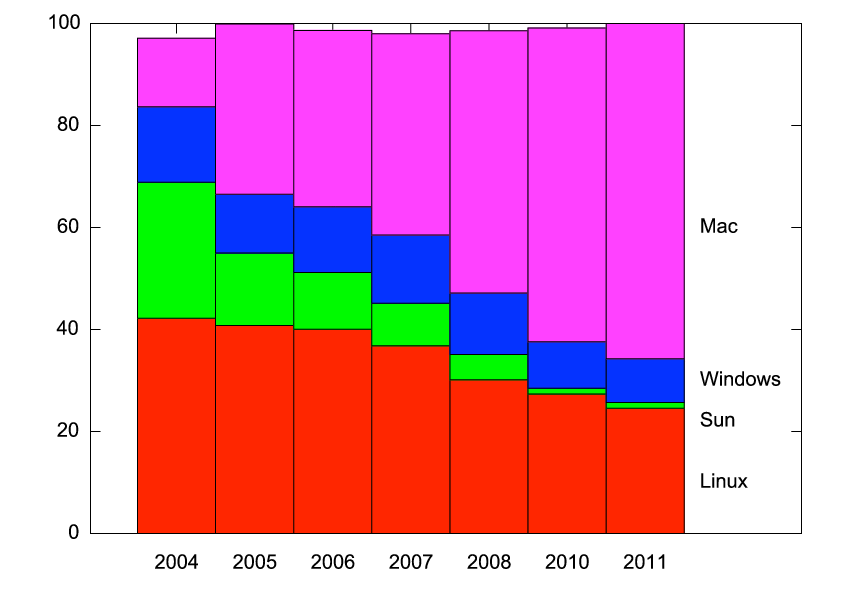
Each cycle had between 700 and 1100 proposals submitted. While there may be wavelength-dependent trends, I would argue that Hubble users are a broad cross-section into the astronomical community.
So this is a fascinating chart! Linux has slowly lost market share, and now serves a quarter of users. And check out the decline of Sun, and the corresponding rise of Macs. These are trends we all know — but it’s neat to see quantification.
Comments? Discussion?
* Ignore the small not-summing-to-100% problem; I digitized the charts from powerpoint figures, and didn’t click with fantastic precision.
Thursday, September 15, 2011
Removing pdf margins
Today I was working under ESO proposals and I would include two figure side by side, as esoform does not accept minipage I generate a pdf with the figures. But, then the problem start. It was necessary to remove the borders of the PDF file (figure I would insert). So I found the following text, at: http://www.mobileread.com/forums/showthread.php?t=25331
By using the first example I was able to remove the borders of my figures page.
*********
Many pdf files come for the printing, thus usually some large margins. But to read on Cybook you don't want margin, or do you? For me I just want as much space to display the text as possible.
I found one tool under linux. Very simple:
PDFCROP 1.5, 2004/06/24 - Copyright (c) 2002, 2004 by Heiko Oberdiek.
Syntax: pdfcrop [options] [output file]
Function: Margins are calculated and removed for each page in the file.
Options: (defaults)
--help print usage
--(no)verbose verbose printing (false)
--(no)debug debug informations (false)
--gscmd call of ghostscript (gs)
--pdftexcmd call of pdfTeX (pdftex)
--margins " " (0 0 0 0)
add extra margins, unit is bp. If only one number is
given, then it is used for all margins, in the case
of two numbers they are also used for right and bottom.
--(no)clip clipping support, if margins are set (false)
--(no)hires using `%%HiResBoundingBox' (false)
instead of `%%BoundingBox'
--papersize parameter for gs's -sPAPERSIZE=,
use only with older gs versions <7.32 ()
Examples:
pdfcrop --margins 10 input.pdf output.pdf
pdfcrop --margins '5 10 5 20' --clip input.pdf output.pdf
By using the first example I was able to remove the borders of my figures page.
*********
Many pdf files come for the printing, thus usually some large margins. But to read on Cybook you don't want margin, or do you? For me I just want as much space to display the text as possible.
I found one tool under linux. Very simple:
PDFCROP 1.5, 2004/06/24 - Copyright (c) 2002, 2004 by Heiko Oberdiek.
Syntax: pdfcrop [options]
Function: Margins are calculated and removed for each page in the file.
Options: (defaults)
--help print usage
--(no)verbose verbose printing (false)
--(no)debug debug informations (false)
--gscmd
--pdftexcmd
--margins "
add extra margins, unit is bp. If only one number is
given, then it is used for all margins, in the case
of two numbers they are also used for right and bottom.
--(no)clip clipping support, if margins are set (false)
--(no)hires using `%%HiResBoundingBox' (false)
instead of `%%BoundingBox'
--papersize
use only with older gs versions <7.32 ()
Examples:
pdfcrop --margins 10 input.pdf output.pdf
pdfcrop --margins '5 10 5 20' --clip input.pdf output.pdf
Sunday, September 4, 2011
See declared variables in python
For those using python for some time, you might miss some tricks that are present in many other script languages such as Perl and Bash.
One that I miss very much in dynamical naming of variables. You can easily overcome this problem using dictionaries:
But python names its variables by storing them on a global dictionary named vars(). So you can create a variable by naming it after a string
I don't know when one might need this, but it is doable.
One that I miss very much in dynamical naming of variables. You can easily overcome this problem using dictionaries:
d = {}

d['foo'] = 'bar'
But python names its variables by storing them on a global dictionary named vars(). So you can create a variable by naming it after a string
vars()['foo'] = 'bar'

print foo
I don't know when one might need this, but it is doable.
Tuesday, July 12, 2011
Ouvindo Rádios do ClicRBS no linux
Para quem curte as rádios do grupo RBS (Atlântida, Gaúcha, Itapema, etc..) ou mesmo quer ver os gols da dupla GreNal e isso (especialmente as rádios) não é possível no firefox do linux porque eles transmitem com o activeX. Descobri uma maneira de fazer isso.
Basta:
1 - No Firefox, clique com o botão direito sobre a imagem do vídeo e selecione a opção:
a) “Este frame” e logo em seguida “Código-fonte”
b) Caso não exista a opção “Este frame”, clique direto em “Código-fonte”.
2 – Busque pela palavra “played” (sem as aspas). Embaixo desta palavra você encontrará um link como no exemplo abaixo:
// Items to be played
urls[1] = ‘http://mediacenter.clicrbs.com.br/templates/GetAsx.aspx?contentID=36890&channelId=40‘;
titles[1] = ‘O dia dos candidatos na Capital’;
Basta copiar o link encontrado e tocá-lo no player, de preferência no totem, tive problemas com o mplayer.
Fonte:
http://josevitor.blog.br/tutorial-assistindo-videos-do-clicrbs-no-linux/
Basta:
1 - No Firefox, clique com o botão direito sobre a imagem do vídeo e selecione a opção:
a) “Este frame” e logo em seguida “Código-fonte”
b) Caso não exista a opção “Este frame”, clique direto em “Código-fonte”.
2 – Busque pela palavra “played” (sem as aspas). Embaixo desta palavra você encontrará um link como no exemplo abaixo:
// Items to be played
urls[1] = ‘http://mediacenter.clicrbs.com.br/templates/GetAsx.aspx?contentID=36890&channelId=40‘;
titles[1] = ‘O dia dos candidatos na Capital’;
Basta copiar o link encontrado e tocá-lo no player, de preferência no totem, tive problemas com o mplayer.
Fonte:
http://josevitor.blog.br/tutorial-assistindo-videos-do-clicrbs-no-linux/
Friday, April 29, 2011
Removendo e/ou girando páginas de um arquivo PDF
Bom, precisei fazer isso uma vez não lembro o motivo...
segue um quase Ctrl-C/Ctrl-V de 'man pdftk'
Remove 'page 6' to 'page 8' from in.pdf to create out.pdf:
$ pdftk in.pdf cat 1-5 9-end output out.pdf
Remove only 'page 1':
$ pdftk in.pdf cat 2-end output out.pdf
Rotate the first PDF page to 90 degrees clockwise:
$ pdftk in.pdf cat 1E 2-end output out.pdf
Rotate an entire PDF document to 180 degrees:
$ pdftk in.pdf cat 1-endS output out.pdf
segue um quase Ctrl-C/Ctrl-V de 'man pdftk'
Remove 'page 6' to 'page 8' from in.pdf to create out.pdf:
$ pdftk in.pdf cat 1-5 9-end output out.pdf
Remove only 'page 1':
$ pdftk in.pdf cat 2-end output out.pdf
Rotate the first PDF page to 90 degrees clockwise:
$ pdftk in.pdf cat 1E 2-end output out.pdf
Rotate an entire PDF document to 180 degrees:
$ pdftk in.pdf cat 1-endS output out.pdf
Thursday, April 14, 2011
Juntando vários arquivos PDF num único arquivo
Pessoal,
Uma dica para juntar arquivos pdf no linux:
Nota: tudo precisa estar na mesma linha.
Uma dica para juntar arquivos pdf no linux:
$ gs -q -dNOPAUSE -dBATCH -sDEVICE=pswrite -sOutputFile=saida.ps -f arq1.ps arq2.ps
$ gs -q -dNOPAUSE -dBATCH -sDEVICE=pdfwrite -sOutputFile=saida.pdf -f arq1.pdf arq2.pdf
$ gs -q -dNOPAUSE -dBATCH -sDEVICE=pdfwrite -sOutputFile=saida.pdf -f arq1.pdf arq2.pdf
Nota: tudo precisa estar na mesma linha.
Monday, April 11, 2011
Truques em Latex - Comentar trechos de texto
Você já se deparou com um parágrafo de texto que gostaria de comentar? e precisa colocar o % em todas as linhas?
Há uma maneira muito prática de fazer isso:
Primeiro:
Ative o pacote verbatim
Há uma maneira muito prática de fazer isso:
Primeiro:
Ative o pacote verbatim
\usepackage{verbatim} Depois é só fazer:
\begin{comment}
Este texto é legal.
Mas meu orientador não gostou.
Por isso tive que comentá-lo!
\end{comment}Viram, muito fácil.
Tuesday, September 28, 2010
Sherpa modeling and fitting package on Ubuntu
Sherpa is a set of fitting and modelling routines used by the people from the Chandra X-Ray Observatory. It is a very robust software with its own interface, although recently they developed a python implementation which is very easy to use. I guess x-ray astronomers must know what they are doing, don't you?
You can find the python package here.
When I tried to install it on Ubuntu 10.04 or 10.10 I faced a really nasty compilation problem with the file Simplex.cc. To fix it you must edit the following file before compiling:
Just add this line to the beginning
If you have all dependencies installed the compilation should run just fine. In the following weeks I will post some examples with Sherpa.
You can find the python package here.
When I tried to install it on Ubuntu 10.04 or 10.10 I faced a really nasty compilation problem with the file Simplex.cc. To fix it you must edit the following file before compiling:
sherpa-4.2.2/sherpa/optmethods/Simplex.cc
Just add this line to the beginning
#include <stdio.h>
If you have all dependencies installed the compilation should run just fine. In the following weeks I will post some examples with Sherpa.
Wednesday, September 22, 2010
Python: how to start learning?
Many (most?) people that want to start learning Python are confused about where to start. So many options! Motivated by this, I list in this post the references that I used to learn Python (and object-oriented programming as well), which can serve as a starting point for other people. I had scientists in mind when I wrote this post.
Beginner material
Learned the basic syntax and capabilities of the language with the official Python tutorial. You can download all of this as PDF files. I suggest this for people with previous programming experience. For absolute beginners, have a look at the Think Python book below.
Computação científica com Python, Fabrício Ferrari (portuguese only)
Introductory lecture about Python, its syntax and science applications. It shows what Python is capable of for data analysis and plotting. Inspiring. The audio is also available for download as a MP3 file.
Tutorial on using Python for data analysis! How to on how to replace IDL/Matlab with Python, essentially. Includes: plotting, FITS files, signal processing.
I learned object-oriented programming using this material. Very clear and "application-oriented" approach. You don't need to be a biologist to understand this.
Longer introduction for people with no previous extensive programming experience.
Quick reference
Migrating from IDL/Matlab to Python.
If you are going to do serious stuff with Python, I suggest using the enhanced interactive Python terminal IPython.
Longer introductory books
Learning Python, Mark Lutz
A primer on scientific programming with Python, Hans Petter Langtangen
Longer reference books
Python essential reference, David Beazley
Wednesday, September 15, 2010
Switching from Windows/PC to Mac
OK, you got your shiny new Mac machine and switched from Windows to Mac OS X. What now? It happens that a friend of mine is going through that process and I assembled a list of links which might be useful for Mac newbies, which you can find below.
Switching from windows to mac, several tips and advice.
Several video tutorials made by Apple. Quick and simple.
My collection of mac-related links. Be sure to check out the following links:
- AlternativeTo.net: find alternative free software to commercial ones
- Mac OS X for scientists: Mac tutorial for scientists
- Best Mac software
Advice on your first Mac.
Friday, July 2, 2010
Assessoria Estatística na UFRGS
Durante o nosso trabalho muitas vezes precisamos realizar um tratamento estatístico cuidadoso dos dados para atingir determinados objetivos científicos. Quando trabalhamos com dados astronômicos, surge uma vasta gama de problemas estatísticos: desde regressões lineares até tópicos mais esotéricos como estatística espacial, estatística bayesiana, bootstrapping etc etc (já ouviram falar na astroestatística?).
Infelizmente, muitas vezes falta aos astrônomos o background estatístico necessário para entender os métodos e aplicá-los corretamente! Isto tem levado a algumas iniciativas para melhorar a formação estatística dos astrônomos, por exemplo: INPE Advanced Course on Astrostatistics, Summer School in Statistics for Astronomers.
Recentemente, fiquei sabendo de uma iniciativa muito legal que existe aqui na UFRGS, através do Ângelo. É o Núcleo de Assessoria Estatística (NAE) do Instituto de Matemática. Este núcleo é composto por um grupo de estatísticos que prestam assessoria para a comunidade. Eis uma lista das áreas da estatística abrangidas pelo NAE.
Como funciona o NAE
Suponha que você tenha dúvidas sobre qual o melhor tratamento estatístico que deve ser usado nos seus dados. Ou talvez você já saiba qual técnica estatística empregar mas gostaria de entender melhor o método e sua aplicabilidade. Você pode se dirigir ao NAE ou ligar pra
eles pra agendar uma consulta. Os estatísticos vão analisar o seu problema e lhe prestar a assessoria apropriada.
É cobrada dos alunos de PG a taxa de R$ 30 para a assessoria (é cobrada uma só vez). Em vista dos possíveis insights estatísticos que você pode ter para explorar melhor os seus dados, facilitar o seu trabalho e mesmo poupar tempo, isto me parece um custo irrisório. Há alguns meses tive que me aventurar numa técnica estatística sobre a qual tinha pouco conhecimento, e certamente o NAE teria me ajudado. Infelizmente não o conhecia na época...
Enfim, fica a dica pra vocês!
NAE - Núcleo de Assessoria Estatística
Infelizmente, muitas vezes falta aos astrônomos o background estatístico necessário para entender os métodos e aplicá-los corretamente! Isto tem levado a algumas iniciativas para melhorar a formação estatística dos astrônomos, por exemplo: INPE Advanced Course on Astrostatistics, Summer School in Statistics for Astronomers.
Recentemente, fiquei sabendo de uma iniciativa muito legal que existe aqui na UFRGS, através do Ângelo. É o Núcleo de Assessoria Estatística (NAE) do Instituto de Matemática. Este núcleo é composto por um grupo de estatísticos que prestam assessoria para a comunidade. Eis uma lista das áreas da estatística abrangidas pelo NAE.
Como funciona o NAE
Suponha que você tenha dúvidas sobre qual o melhor tratamento estatístico que deve ser usado nos seus dados. Ou talvez você já saiba qual técnica estatística empregar mas gostaria de entender melhor o método e sua aplicabilidade. Você pode se dirigir ao NAE ou ligar pra
eles pra agendar uma consulta. Os estatísticos vão analisar o seu problema e lhe prestar a assessoria apropriada.
É cobrada dos alunos de PG a taxa de R$ 30 para a assessoria (é cobrada uma só vez). Em vista dos possíveis insights estatísticos que você pode ter para explorar melhor os seus dados, facilitar o seu trabalho e mesmo poupar tempo, isto me parece um custo irrisório. Há alguns meses tive que me aventurar numa técnica estatística sobre a qual tinha pouco conhecimento, e certamente o NAE teria me ajudado. Infelizmente não o conhecia na época...
Enfim, fica a dica pra vocês!
NAE - Núcleo de Assessoria Estatística
Monday, June 21, 2010
New STSCI Python package (2.10)
Those who updated Ubuntu from version 9.10 (Karmic Koala) to 10.04 (Lucid Lynx) might have noticed that Python 2.5 is not available in the new default repository. This is a big issue for the users such as the users of the Space Telescope Science Institute Python packages (PyRAF, MultiDrizzle, etc...) or some older google engine apps.
Fortunately a new version of the stsci_python is out today! With full support to Python 2.6 (3.0 will take longer).
http://www.stsci.edu/resources/software_hardware/pyraf/stsci_python/current/download
Update (21/06)
Some may have the following error when importing the iraf modules using
To fix it the trailing slash on the /iraf/iraf/unix/hlib/zzsetenv file on line 38 should be removed. Everything runs smoothly.
Fortunately a new version of the stsci_python is out today! With full support to Python 2.6 (3.0 will take longer).
http://www.stsci.edu/resources/software_hardware/pyraf/stsci_python/current/download
Update (21/06)
Some may have the following error when importing the iraf modules using
from pyraf import iraf
  File "", line 38
    iraf.set(as = 'host$as/')
              ^
SyntaxError: invalid syntax
/usr/local/lib/python2.6/dist-packages/pyraf/irafimport.py:54: RuntimeWarning: Parent module 'pyraf' not found while handling absolute import
  return _originalImport(name, globals, locals, fromlist, level)
To fix it the trailing slash on the /iraf/iraf/unix/hlib/zzsetenv file on line 38 should be removed. Everything runs smoothly.
Saturday, June 19, 2010
Practical spell checker: aspell
aspell is a practical spell checker available for Linux and Mac OS X. It is installed by default on most linux distros. You can get it in mac using MacPorts/Fink. aspell goes through your document, asking to replace words that it suspects are wrong.
I used it a few days ago to spell check a paper of mine before submitting. It has different modes, for instance a TeX mode. Here is how you call it to spell check a latex document written in english:
aspell check -l en --mode tex paper.tex
How to spell check a document in brazilian portuguese:
aspell check -l pt_br test.txt
Try it, it is very easy to use.
I used it a few days ago to spell check a paper of mine before submitting. It has different modes, for instance a TeX mode. Here is how you call it to spell check a latex document written in english:
aspell check -l en --mode tex paper.tex
How to spell check a document in brazilian portuguese:
aspell check -l pt_br test.txt
Try it, it is very easy to use.
Friday, June 18, 2010
Google CL is amazing
This post was done using only the *NIX command line using the googlecl (http://code.google.com/p/googlecl/) tool. Try it
Wednesday, June 2, 2010
Vim tricks for Python programmers
Hi there, as many of my friends know I am a Vi enthusiast. The truth is that I am just faster using Vi than using the mouse in any graphical editor. I know many of *NIX users would agree with me when it comes to command line vs. clicking.
This post is for Vi users that may find frustrating programming Python without a mouse cursor to help on indentation and block selection. The tricks are to set these environmental variables on Vi:
So if you put this on your ~/.vimrc you should get a Vi that is Python friendly every time you edit a *.py file.
Essentially these options will make tabs become 4 spaces and add auto-indentation after keywords of python (if, while, do, try, etc...). For more info on each command type on Vi ':help'
Have fun!
This post is for Vi users that may find frustrating programming Python without a mouse cursor to help on indentation and block selection. The tricks are to set these environmental variables on Vi:
autocmd BufRead *.py \
set expandtab \
set tabstop=4 \
set shiftwidth=4 \
set smarttab \
set softtabstop=4 \
set autoindent \
set textwidth=110
autocmd BufRead *.py set smartindent \
inwords=if,elif,else,for,while,try,except,finally,def,class
So if you put this on your ~/.vimrc you should get a Vi that is Python friendly every time you edit a *.py file.
Essentially these options will make tabs become 4 spaces and add auto-indentation after keywords of python (if, while, do, try, etc...). For more info on each command type on Vi ':help
Have fun!
Monday, May 17, 2010
Visto EUA em SP: Algumas dicas
Acabei de voltar de São Paulo, onde fui pra tirar um visto acadêmico pros Estados Unidos. Gostaria de compartilhar algumas dicas que podem ser úteis pra quem for passar pelo mesmo processo.
Hospedagem: Eu recomendo o hotel Intercity Nações Unidas, que até onde eu sei é o mais barato nas proximidades do consulado. A estadia no fim de semana é mais barata. Eu paguei uma diária de R$ 155 (mais taxas) ficando de Domingo para Segunda-feira (minha entrevista de visto foi na Segunda). Tem um ponto de táxi na frente do hotel. Para a janta, há uns restaurantes acessíveis na Fernandes Moreira (a rua do hotel). Não recomendo a comida do hotel, que é extremamente cara e não vale o preço.
Caixas eletrônicos: Vá com dinheiro para o consulado para pagar as taxas consulares e sedex, que vão dar mais de cem reais dependendo do visto. Se você precisar de caixa eletrônico, há vários deles no Carrefour da Rua Alexandre Dumas, a cerca de duas quadras do Intercity. Tem caixa eletrônico do Banco do Brasil, Santander, Unibanco etc.
Celular, Ipod etc no consulado: Nenhum eletrônico é permitido dentro do consulado, e eles não têm mais guarda-volumes dentro do consulado. Portanto, ou não leve eletrônicos na entrevista, ou deixe as suas coisas em um dos guarda-volumes que existem na frente do consulado por sua conta e risco (foi o que eu acabei fazendo).
DS-160: O sistema de preenchimento de informações para visto mudou, e agora é tudo online, através do formulário DS-160. Eu tive uma experiência ruim com este sistema: a cada 20 minutos/meia hora o sistema me desconectava, e todas as informações que eu tinha digitado eram perdidas. A solução é a cada 20 minutos salvar um arquivo com as informações do formulário, que pode ser importado caso você seja desconectado. É dose, eu sei. Outra: você vai levar no mínimo uma hora preenchendo este formulário.
Hospedagem: Eu recomendo o hotel Intercity Nações Unidas, que até onde eu sei é o mais barato nas proximidades do consulado. A estadia no fim de semana é mais barata. Eu paguei uma diária de R$ 155 (mais taxas) ficando de Domingo para Segunda-feira (minha entrevista de visto foi na Segunda). Tem um ponto de táxi na frente do hotel. Para a janta, há uns restaurantes acessíveis na Fernandes Moreira (a rua do hotel). Não recomendo a comida do hotel, que é extremamente cara e não vale o preço.
Caixas eletrônicos: Vá com dinheiro para o consulado para pagar as taxas consulares e sedex, que vão dar mais de cem reais dependendo do visto. Se você precisar de caixa eletrônico, há vários deles no Carrefour da Rua Alexandre Dumas, a cerca de duas quadras do Intercity. Tem caixa eletrônico do Banco do Brasil, Santander, Unibanco etc.
Celular, Ipod etc no consulado: Nenhum eletrônico é permitido dentro do consulado, e eles não têm mais guarda-volumes dentro do consulado. Portanto, ou não leve eletrônicos na entrevista, ou deixe as suas coisas em um dos guarda-volumes que existem na frente do consulado por sua conta e risco (foi o que eu acabei fazendo).
DS-160: O sistema de preenchimento de informações para visto mudou, e agora é tudo online, através do formulário DS-160. Eu tive uma experiência ruim com este sistema: a cada 20 minutos/meia hora o sistema me desconectava, e todas as informações que eu tinha digitado eram perdidas. A solução é a cada 20 minutos salvar um arquivo com as informações do formulário, que pode ser importado caso você seja desconectado. É dose, eu sei. Outra: você vai levar no mínimo uma hora preenchendo este formulário.
Sunday, April 18, 2010
Seminários de AstroProgramação
Ás vezes queremos aprender novas linguagens de programação, mas pela falta de tempo acabamos não conseguindo. Para acelerar o processo de aprendizado, está acontecendo no Departamento de Astronomia da UFRGS os Seminários de AstroProgramação: uma série de palestras informais, cada uma devotada a uma linguagem de programação diferente, com foco nos astrônomos.
A proposta é que a cada semana, um voluntário dê uma palestra a respeito das virtudes da linguagem de programação de sua escolha. Cada palestra deve apresentar um exemplo simples de programa (tipo "hello world"), bem como alguns códigos-fontes um pouco mais sofisticados que demonstrem a sintaxe básica etc. A duração das palestras é semelhante a de um seminário de grupo.
As linguagens abordadas foram: IDL, Perl, Python, C, Fortran 90, PHP, programação orientada a objetos com C++, paralelização (MPI) e Tcl/Tk.
Os slides apresentados nas palestras, bem como material adicional (códigos-fontes etc) estão disponíveis nesta página.
Changelog:
A proposta é que a cada semana, um voluntário dê uma palestra a respeito das virtudes da linguagem de programação de sua escolha. Cada palestra deve apresentar um exemplo simples de programa (tipo "hello world"), bem como alguns códigos-fontes um pouco mais sofisticados que demonstrem a sintaxe básica etc. A duração das palestras é semelhante a de um seminário de grupo.
As linguagens abordadas foram: IDL, Perl, Python, C, Fortran 90, PHP, programação orientada a objetos com C++, paralelização (MPI) e Tcl/Tk.
Os slides apresentados nas palestras, bem como material adicional (códigos-fontes etc) estão disponíveis nesta página.
Changelog:
- 23 Abr 2010: adicionei Tcl/Tk à lista.
- 11 Jul 2010: removi OpenMP da lista.
Subscribe to:
Posts (Atom)
